

Managing users & org structure
Add and maintain employee records — role, department, reporting line, employment type — invite people to sign in, and manage the business units, departments and designations behind them.
What you can do here
- Create and maintain employee records.
- Place people in the org: business unit, department, designation, and who they report to.
- Handle the lifecycle — probation, converting an intern, recording a leaver.
- Maintain the org scaffolding itself.
The user list
Users shows each person's Employee, Department, Roles, when they Joined, and their Status, with actions to view their profile, edit them, and deactivate or reactivate them. Filter by Business Unit, Department, Roles, and Statuses.
The list opens on Active people only. That is the Statuses filter's starting position, and it is the usual reason somebody you expected isn't in the list — switch it to All Statuses, or pick the one you want: Active, On Notice, Deactivated, Terminated, or Pending Invite (people whose account exists but who have never signed in).
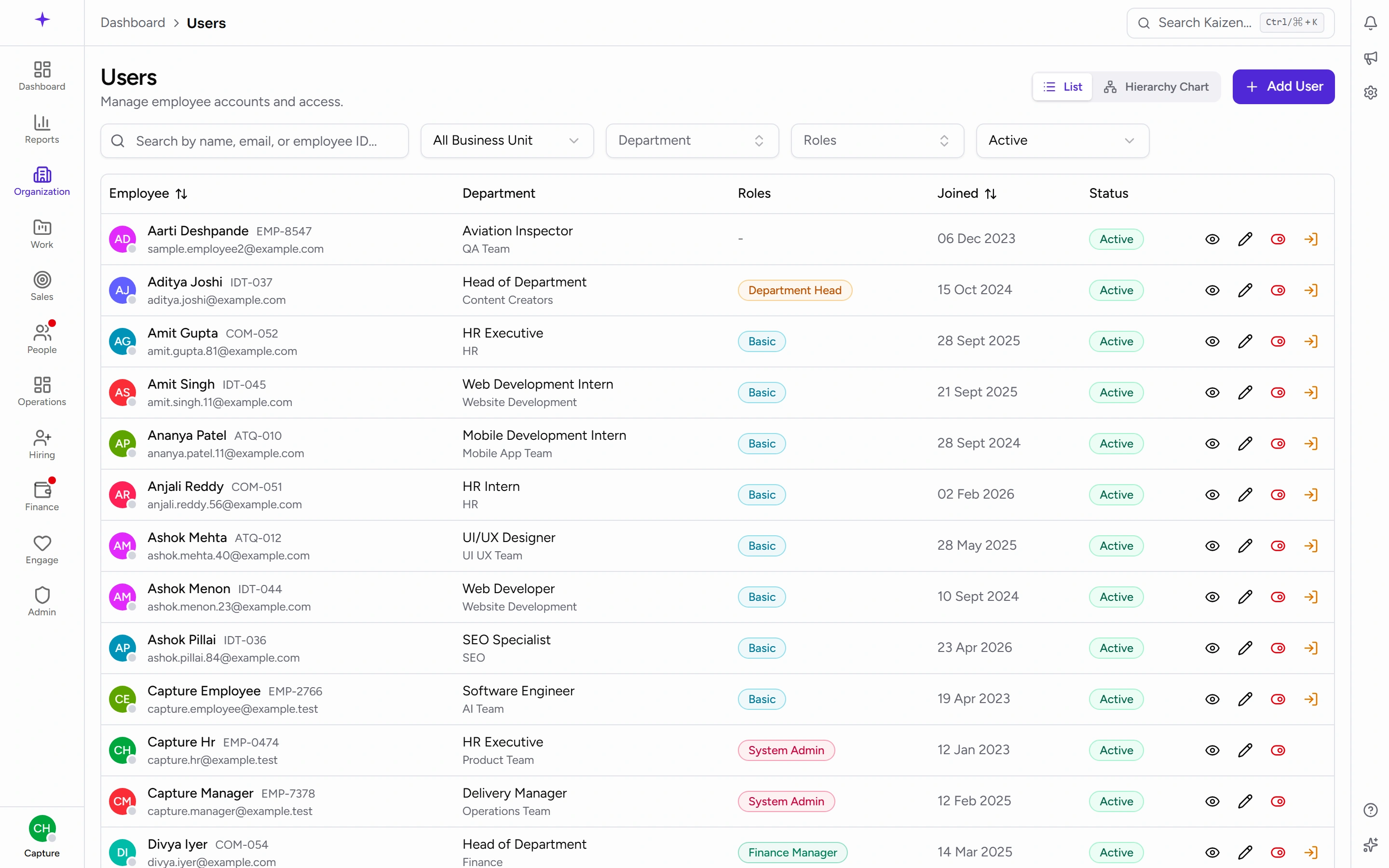
If you're still the only person here, the page says so and offers the two ways forward — bring everyone in at once from Organization → Data Import, or add someone by hand. Adding people one at a time is perfectly legitimate; the importer just saves you doing it fifty times.
Adding and editing someone
The form is grouped:
Basic Information — Employee ID, Full Name, and Email. There is deliberately no password field: No password needed — they'll get an email invitation to set up their own sign-in.
Company Information — Business Unit, then Department, then Designation. They cascade in that order, so picking the business unit narrows the departments available. Then Roles (more than one is fine), Reporting To, Date of Joining, and:
- Employment Type — Regular, Intern, or Probation.
- Status — Active, On Notice, Deactivated, or Terminated.
Personal Information — phone, personal email, date of birth, gender, blood group and the rest.
Role versus designation
A designation is the job title in the org chart — it belongs to a department, and it's what colleagues see in the directory. A role decides what someone can do in Kaizen. They're unrelated: a Senior Developer and an Office Manager might hold the same role, and one person can hold several roles but only one designation.
Getting people signed in
Adding someone creates their record. It doesn't let them in — an invitation does that, and it's a separate, deliberate step.
Each person sets their own password from the link they're emailed. You never create or share one, which is why there's no password box on the form.
Sending invitations
- Send invitation on a person's row invites one individual. Once they've had one, the same action reads Resend invitation.
- Invite all pending (n) in the toolbar mails everyone who is waiting. The number is exactly who will be contacted, so there's no guessing before you confirm.
- Selecting rows first invites only those people.
A bulk send only ever reaches people who have never signed in, and never you. It can't accidentally mail the whole company, and someone who has already signed in is skipped even if they're caught up in a selection.
Reading the status
Two statuses describe people who haven't signed in yet:
- Invited — the email has gone out and you're waiting on them. Hovering shows the date it was sent.
- Pending setup — the account exists but nobody has ever invited them. This is the one to watch for: an account in this state is invisible to its owner.
Everyone else shows their normal employment status. The Pending Invite filter lists exactly the people a bulk send would reach.
If someone can't get in
Resend. A new invitation immediately kills any earlier one, so tell people to use the most recent email — an older link in the same inbox is dead, not a spare.
Invitation links last 72 hours. What the person sees at the other end is covered in Joining your workspace.
On a workspace that uses Microsoft sign-in only, the invitation points at the sign-in page instead of a password form, because there's no password for them to set.
Lifecycle
- Convert an intern to regular when they come off an internship, from their record.
- Record a separation with a Last working day when someone resigns. On Notice is the status for the period in between.
- Cancel a separation if they stay after all.
- Deactivate blocks sign-in while keeping the record and everything attached to it. Reactivate the same way.
Deactivating rather than deleting is the rule. Their time logs, leave history and payslips all remain, and the reporting that depends on them stays correct.
Deactivated is the word throughout — on the button, in the Statuses filter, and on the badge against their name. On Notice and Terminated are different things: they describe the employment, not whether the account can sign in.
Doing it from their profile
You don't have to go back to the user list. Open the person's profile and the buttons are on the header, beside Apply leave:
- Deactivate — on anyone whose account is currently active.
- Reactivate — on anyone whose account isn't.
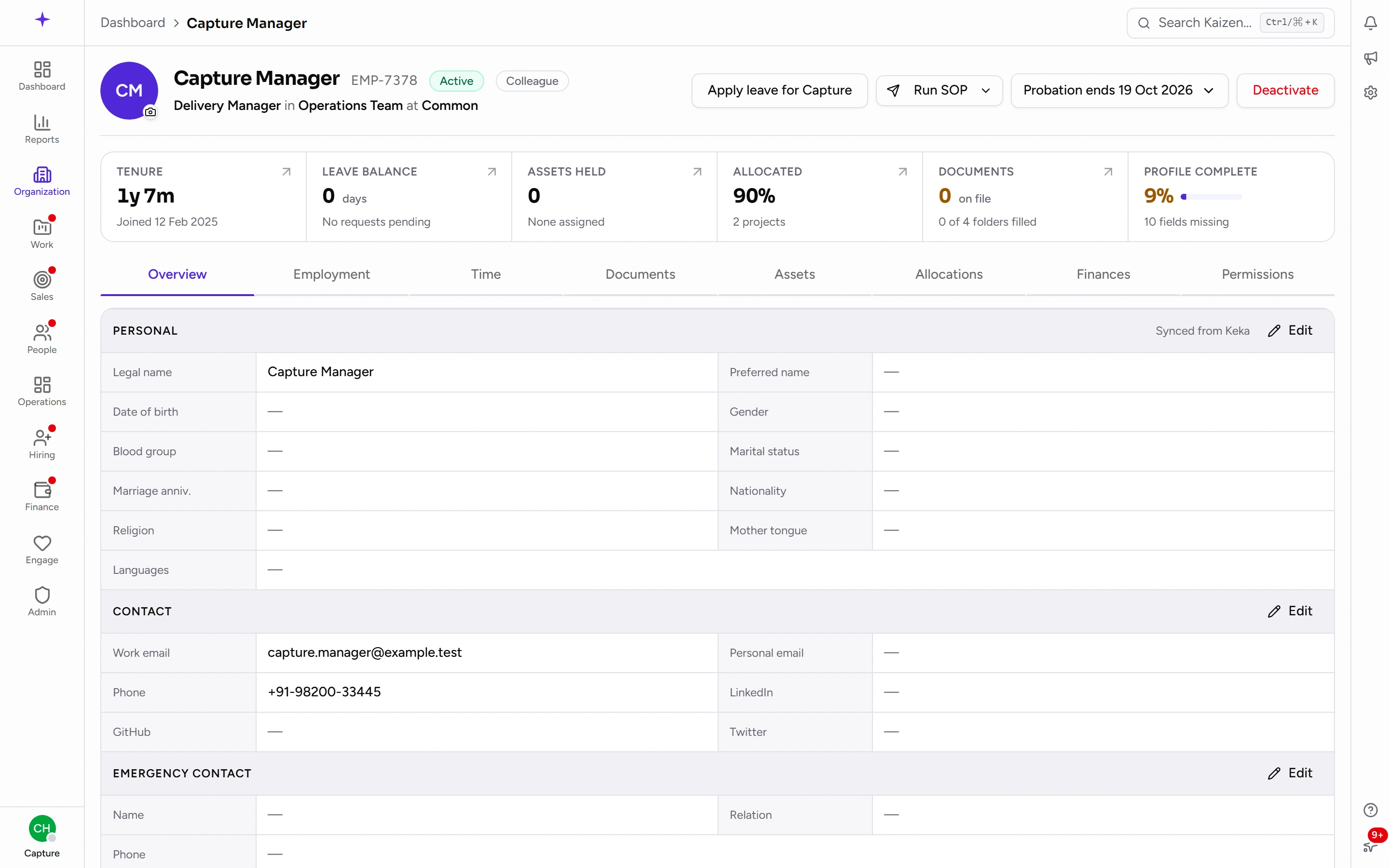
They ask the same questions and keep the same record as the ones in the list. Two things to expect: you'll never see them on your own profile, and you'll only see them on someone you're allowed to edit — which is why a colleague's profile may show neither.
Probation and internships, from the profile
While someone is on Probation or is an Intern, their profile header carries a button naming where they stand — Probation ends with the date, or just On probation if no end date has been set yet. Open it for the two things you'd want to do:
- Confirm as regular employee — ends the plan and moves them to Regular. Their leave is rebuilt on the regular entitlement.
- Extend probation (or Set probation end date, if there wasn't one) — moves the date and records why. For an intern the same two read internship instead.
Ending someone's employment isn't in here; that's Deactivate beside it.
Org structure
Three levels, each depending on the one above:
- Business Units — the top level.
- Departments — each belongs to a business unit.
- Designations — each belongs to a department, and can nest under a Parent Designation to build the reporting tree.
Set these up before adding people. Adding a designation mid-flow because it doesn't exist yet is how inconsistent org data starts.
Per-person permission overrides
A person's profile has a Permissions view where an individual grant can be added or removed on top of what their roles give them.
Use this sparingly. Overrides are invisible from the role matrix, so a permission puzzle that "makes no sense from the roles" is usually an override somebody added months ago. Where several people need the same thing, change the role instead.
Good to know
- You can't delete a business unit, department, or designation that's still referenced. Deactivate it instead — the history stays intact.
- Cascading selects mean an empty department list is usually the wrong business unit rather than missing data.
- Reporting To drives approvals. Leave, WFH and attendance corrections route by reporting line, so a blank or wrong manager is why requests reach nobody.