

Reference data & catalogs
The admin-controlled lists every dropdown in Kaizen draws from — leave types and plans, holidays, categories, sources, skills, and asset categories.
What you can do here
- Maintain the lists that populate dropdowns across Kaizen.
- Add entries, edit them, and retire the ones no longer used.
These are small screens with large consequences: an empty catalog here is an unusable form somewhere else.
Where they live
Most of these live in the Admin area rather than having sidebar entries of their own. Open Admin and a settings rail appears down the left, grouped by what each screen configures: leave types, leave plans and the WFH policy under Leave & Attendance; policy categories under Organisation; ticket and asset categories under Helpdesk & Assets; lead sources, lead stages and inquiry sources under Sales; skills under Performance. The rail stays alongside whichever screen you're on, so you move between catalogs directly rather than going back to an index — and typing into Search settings… at the top filters it, which is the quickest route when you know what a screen is called but not where it sits.
You can also get to a module's catalogs from the module itself: the gear on its page header lists the settings screens that belong to it.
Two also have places of their own in the sidebar. Holidays sits under People, and Inquiry Sources under Sales, beside the inquiries it feeds.
The catalogs
- Leave Types and Leave Plans — feed the leave form and everyone's annual balances.
- Holidays — feed the leave and attendance calendars.
- Ticket Categories — decide which team a support ticket reaches.
- Policy Categories — group published policies.
- Lead Sources and Inquiry Sources — record where opportunities come from.
- Lead Stages — the lanes a lead moves through on the leads board. See below; it's the one catalog with rules of its own.
- Skills — tag people, and drive the skills search when finding available resources.
- Asset Categories — classify equipment.
Adding and retiring entries
Open the catalog and use its add action — Add Leave Type, New Holiday, New Plan, and so on. For most catalogs the form slides in as a panel beside the list, so you never lose your place. Fill in the fields and save; the entry appears in the dropdown it feeds straight away.
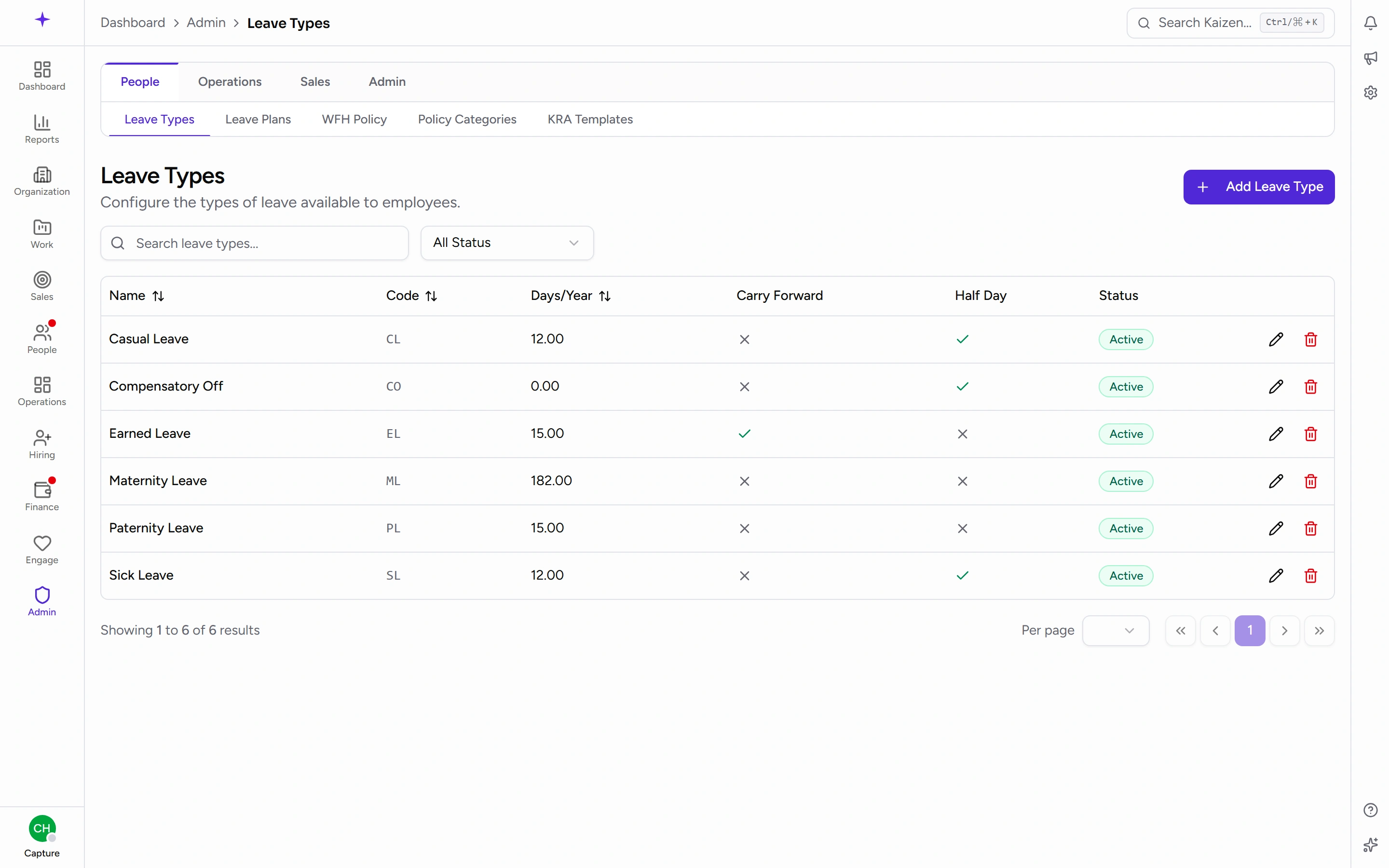
To retire something, deactivate it rather than deleting it. Existing records keep pointing at it, history stays intact, and it simply stops being offered for new ones.
Lead stages are a catalog with rules
Lead Stages (Pipeline Stages on the screen itself) behaves like the other catalogs, with three differences worth knowing before you rearrange a sales board under people.
Each stage carries a name, a probability — the odds a deal at that point is expected to close, which feeds the pipeline's forecast — and a lane colour. Drag to reorder: top to bottom here is left to right on the leads board.
Three stages carry a job as well as a name — where leads start, what counts as won, and what counts as lost. They're marked on the list, they rename and reorder like any other, and they can't be removed: without them a new lead has nowhere to land and a closed deal has nothing to convert from.
Removing any other stage asks where its leads should go first. You pick a destination and every lead there moves across, archived ones included — they still point at the stage even though nobody can see them. The move is recorded on each lead's own history, so a lead sitting somewhere nobody dragged it to can be explained later. Deals keep the probability they had; retiring a lane isn't sales progress.
Leave plans deserve a mention
Leave Plans is the biggest of these. A plan defines the leave entitlement, and it's assigned to one or more business units — so different parts of the company can have different allowances without separate systems.
Plans also handle the year-end rollover, which is what carries balances into the new year.
Get the plan right before the year starts. Balances follow the plan, and correcting entitlements after people have started booking leave against them is unpleasant.
Holidays and the leave calculation
Holidays aren't only decoration on a calendar. Mandatory holidays inside a leave request aren't counted against the person's balance; optional holidays are.
So marking a holiday optional or mandatory directly changes what a day off costs an employee. It's the highest-consequence field in any of these catalogs.
Good to know
- An empty dropdown almost always means an empty catalog. If someone reports that they can't pick a leave type or a ticket category, check here first.
- Categories and sources are worth keeping short. Every extra option is a decision someone has to make, and long lists produce inconsistent data.
- Inquiry sources carry a signing secret and per-form defaults — those are covered with inquiries, since connecting a form is an inquiries job even though the list is a catalog like the rest of these.