

Roles & permissions
Create roles and set what each can do, using a matrix with four scope levels — Own, Team, Business Unit, and Company.
What you can do here
- Create roles and decide exactly what each can do.
- Set every permission at the scope that fits — just their own records, their team, their business unit, or the whole company.
- Start from a preset, or copy a role that's close.
Setting a role's permissions happens here. Giving a person a role happens on their user record.
Roles live in the Admin area, under Security & Access in the settings rail.
The four levels
Every permission is granted at a scope:
- Own — only their own records.
- Team — theirs and their reports'.
- Business Unit — everyone in their business unit.
- Company — everything.
Granting a higher level includes the ones below it. Someone with Business Unit doesn't also need Team and Own ticked.
This is the single most useful thing to understand about access here. "Can they see leave requests?" is almost never the real question — the question is whose.
"Own" means responsible for it, not attached to it — when changing something
For viewing, Own is wide on purpose: a project you work on is yours to see, and that is what the level is for.
For editing and deleting it is narrower, and the difference matters:
- A project is the project manager's and the salesperson's — not everyone on the team's.
- A task is the assignee's and whoever created it — being on the project it belongs to isn't enough.
- A client is the salesperson's.
- A review is the reviewer's — not the person being reviewed.
So someone can quite correctly see a project in their list, and still not be able to change it. If that's not what you want for a particular person, give them the wider level rather than expecting Own to cover it.
The roles list
Each role shows its Name, whether it's a System role, how many Permissions it grants, and how many Users hold it.
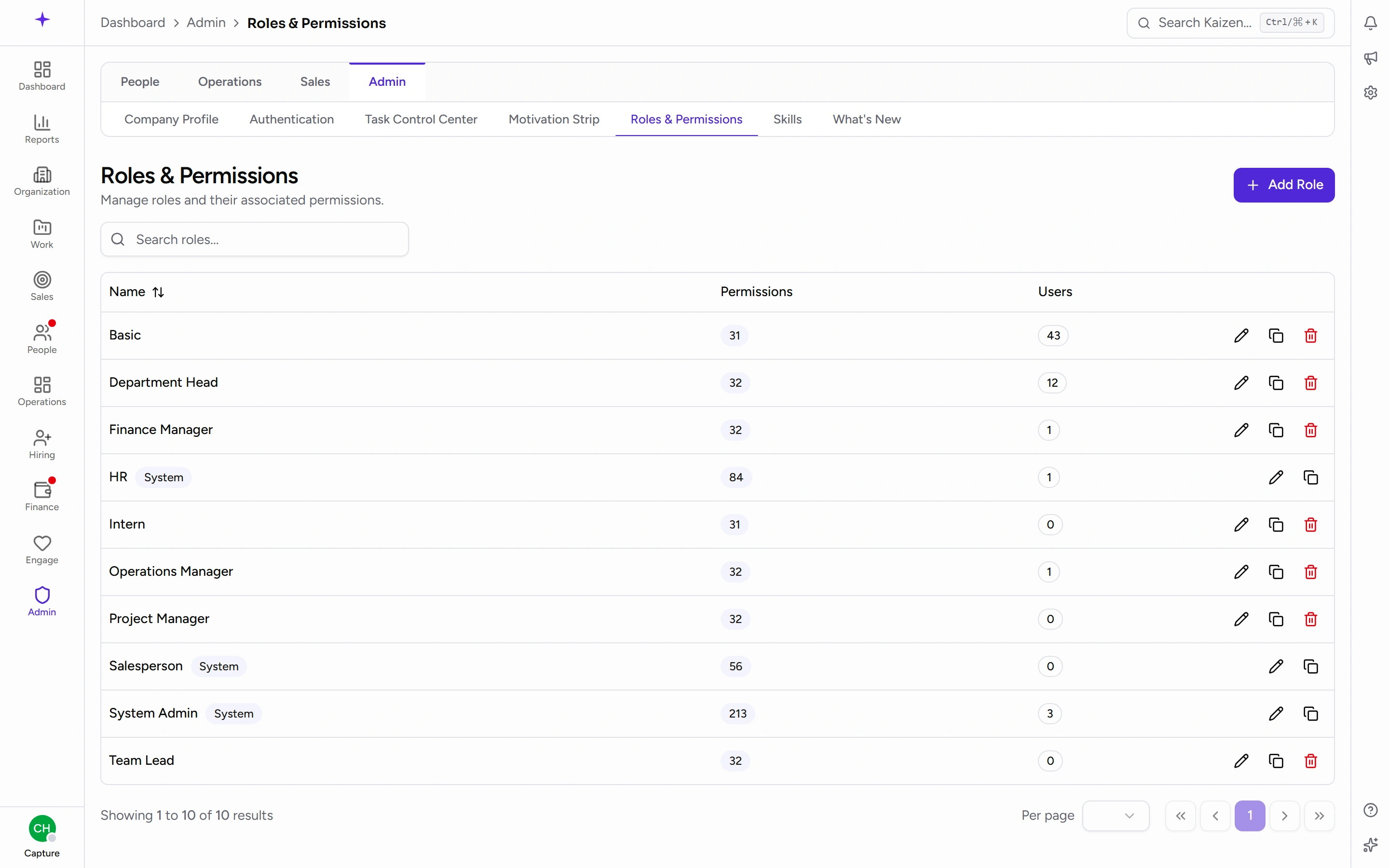
That Users count is worth watching. A role with one person is often an override that should have been a personal exception; a role with everyone is often doing too much.
Common tasks
Create a role
Name it, then work down the matrix ticking permissions at the level you want. Resource rows let you set a whole group at one level rather than clicking each permission.
Start from a preset
Apply one of Basic, Manager, Head, or Admin and adjust from there. Much safer than building from an empty matrix, where it's easy to miss the permission that makes a screen usable.
Copy a role
Duplicate an existing role to get an editable copy, then rename and adjust it. The right move when a new role is "like Manager, but…".
Edit
Open the role, change the name or the matrix, and save.
System roles and locked cells
Built-in System roles are protected. Their name and core permissions are locked and they can't be deleted.
In the matrix, a locked cell shows a lock icon: it's a floor that can't be removed, because taking it away would break what that system role is for. You can grant more on top; you can't take the floor away.
Good to know
- You can't delete a role that still has people assigned. Move them first.
- Individual people can have permission overrides on their own record, on top of their roles. Those don't show up here — so if someone can do something the matrix says they shouldn't, check their profile.
- Prefer changing a role over adding overrides whenever more than one person needs the same access. Roles are visible and reviewable; overrides quietly accumulate.