

Salary structures & pay components
Build the pay heads, the templates that split a CTC across them, and each employee's finalised salary structure that payroll runs from.
What you can do here
- Define the pay heads everything is built from.
- Write reusable templates that split a CTC across those heads.
- Give each employee a structure, and finalise it so payroll can use it.
Three layers, and they stack: components → templates → per-employee structures.
1. Pay components
The individual heads. Each has a name, a code, and the label that appears on a payslip, plus:
- A Type — an earning, a deduction, an employer contribution, or a reimbursement.
- How it's calculated — a fixed amount, a percentage of another value, or a statutory head (PF, ESI, PT, TDS) that works itself out.
- Switches for whether it's taxable, whether it shows on the payslip, whether it pro-rates, and — for earnings — whether it's variable pay.
Components can be deactivated rather than deleted, which is how you retire a head without disturbing the history that references it.
2. Salary templates
A template is the recipe: which components apply, and a formula for each over the CTC and gross — for example [GROSS]*0.5.
One earning is marked balancing. It absorbs whatever is left after the others are worked out, so the parts always add up to the whole. Statutory heads calculate themselves and don't need a formula.
Templates are what keep compensation consistent — the difference between "everyone on this template" and thirty individually hand-built structures.
3. Per-employee structures
Salary Structures lists everyone with a structure: Employee, Status, Gross, Net, and Effective From.
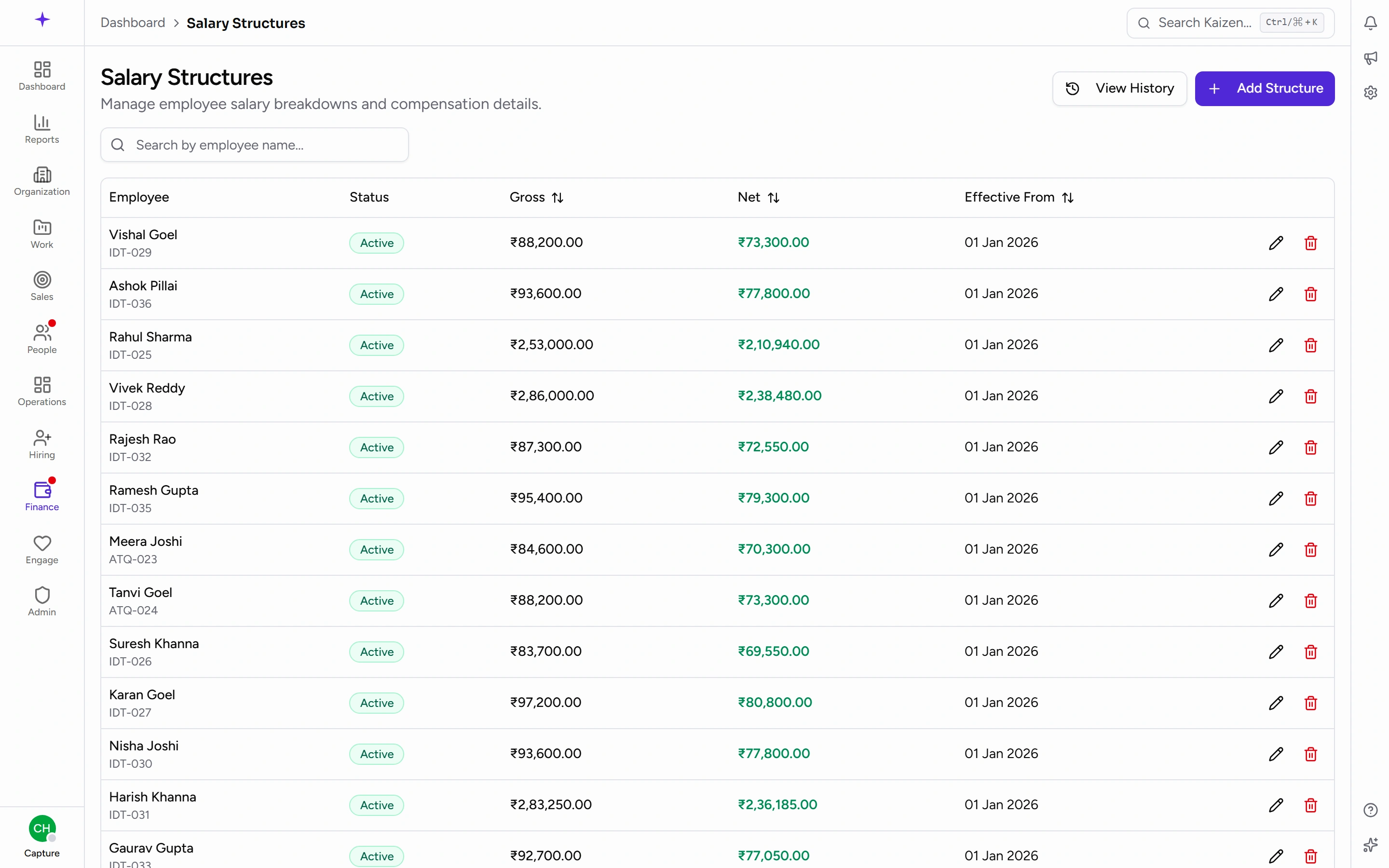
To add one:
- Pick the Employee, a Salary template, and the CTC.
- The full breakdown previews as you type. Override an individual row if this person's arrangement genuinely differs.
- Save draft while you're still checking.
- Finalize to make it the employee's active salary.
Changing someone's salary
A finalised structure can't be edited — that's the point of finalising. Use Revise to open a new draft, change it, and finalise that. Effective From is what marks the boundary between the old arrangement and the new.
Good to know
- Payroll runs from finalised structures only. A draft doesn't pay anyone, and an employee with no finalised structure shows Salary structure pending payroll setup on their profile.
- Variable pay counts toward CTC but isn't part of the monthly gross. The actual amount is entered per run during payroll, which is why a payslip's variable line can differ month to month while the structure stays the same.
- Revising a structure doesn't reach back into payslips already finalised. To correct a month that's gone out, reopen that payroll run.
- Preview before finalising. It's the cheapest moment to notice that a formula has put the money somewhere unintended.