

Restoring deleted records
Bring back a recently deleted record — see everything deleted across the workspace, check whether a restore is safe, and understand why some records are blocked.
What you can do here
- See what's been deleted across the whole workspace, in one list.
- Bring a record back with one action — if it's safe to come back.
- See why when it isn't.
You'll find it in the Admin area, under Data & Recovery in the settings rail.
Only the workspace's system administrator sees this page. That's deliberate, and it isn't something a role can be granted: this list shows everything anyone has deleted, anywhere in the workspace, so handing it out with a permission would quietly hand out visibility into everything else too.
The list
Each row shows the record's Type, the Record itself, who it was Deleted by, when, and a Status verdict:
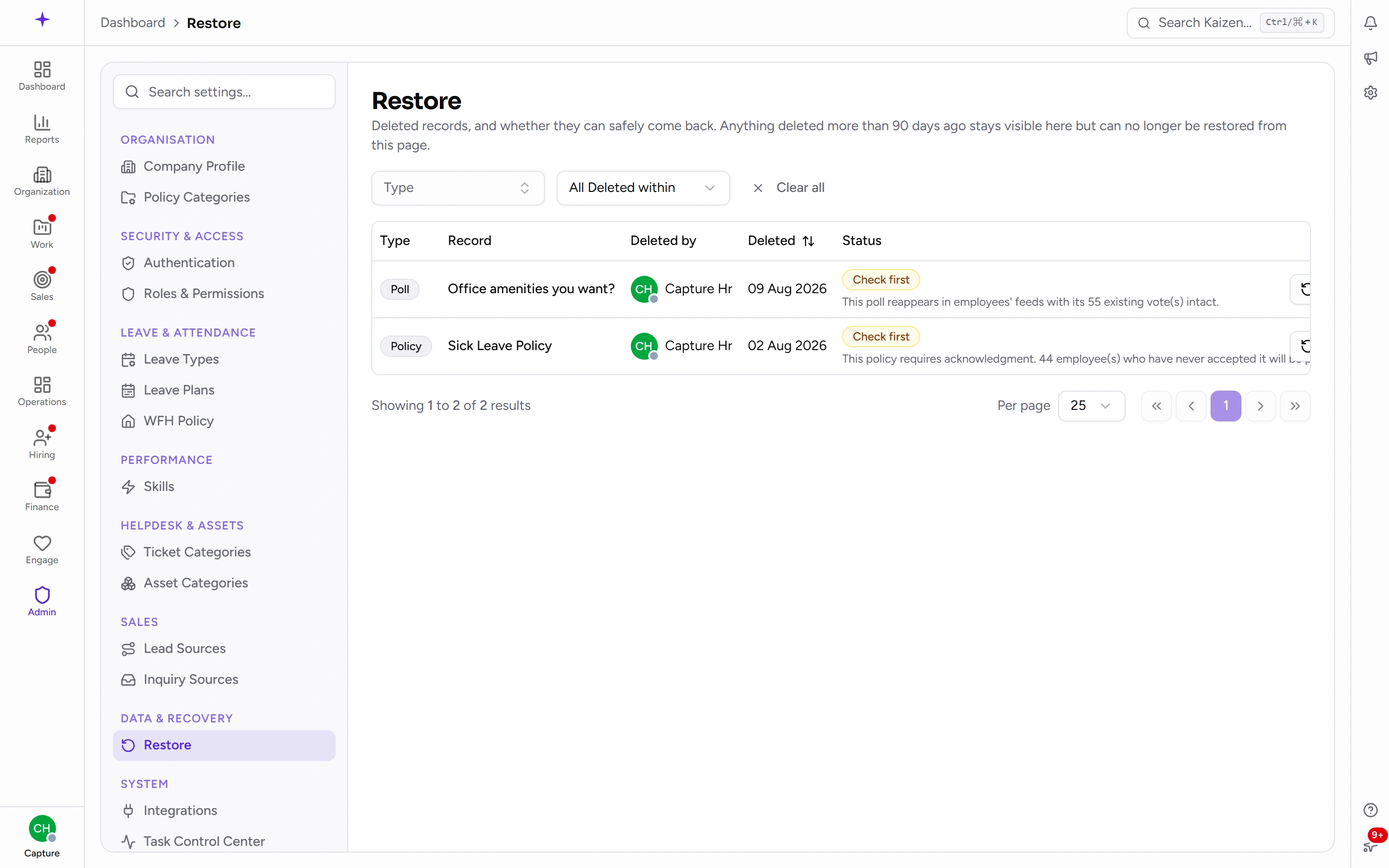
- Restorable — safe to bring back. Go ahead.
- Check first — it will restore, but there's something worth knowing; the note beside the badge says what.
- Blocked — restoring it would break something, and the note says exactly what. The restore action is disabled until the reason no longer applies.
Filter by Type or by Deleted within (last 7 days up to the last year) to find what you're looking for. The most common visit to this page is "someone deleted something ten minutes ago" — the newest deletions sit at the top, so it'll be the first row you see.
Why a restore can be blocked
Deleting in Kaizen is rarely destruction — most records are kept, flagged as deleted, exactly as they were. What decides whether one can come back isn't age; it's whether the world has moved on underneath it:
- Something took its place. If a new record now holds a value the deleted one needs back — the same unique identifier, say — restoring would create a collision. The newer record wins; the restore is blocked and the note names the conflict.
- It's too old. Past the restore window (90 days, unless your workspace is configured differently), a restore stops being a button and should be a deliberate, thought-through data operation. Ask Kaizen support at that point rather than working around it.
Check first is the softer case — the record can come back, but with something attached. The usual one: the record it belongs to is also deleted, so it would come back orphaned until that parent is restored too. The note beside the badge says which record that is.
Good to know
- Restore, don't recreate. A restored record comes back with its history, its relationships, and its identity. A recreated one is a new record that happens to look similar — links from everywhere else stay broken.
- The list is capped per type, so an enormous cleanup doesn't drown the page. Narrow with the filters if what you need isn't visible.
- Restores are recorded in the audit trail like any other change, so it's always possible to see what came back, and who brought it back.